


 Lumière Thrift
The control room
Broadcast, products, chat and orders on one screen. Put on sale, change a price or the stock in the middle of the live.
LiveLive shopping · Multistreaming
And collab with our community.
From OBS, your browser or your phone.
One live, streamed to
Stream everywhere. Sell in one place. TikTok, Instagram, YouTube, Twitch, Facebook, Kick, Any RTMP server.
How it works
Three moves, and your audience becomes a shop.
Vintage Thursday
 THU 9:00 PM
Vintage Thursday
https://yourshop.com/products/wool-jacket
Imported from Shopify
Lineup
What you will present on air, in this order.

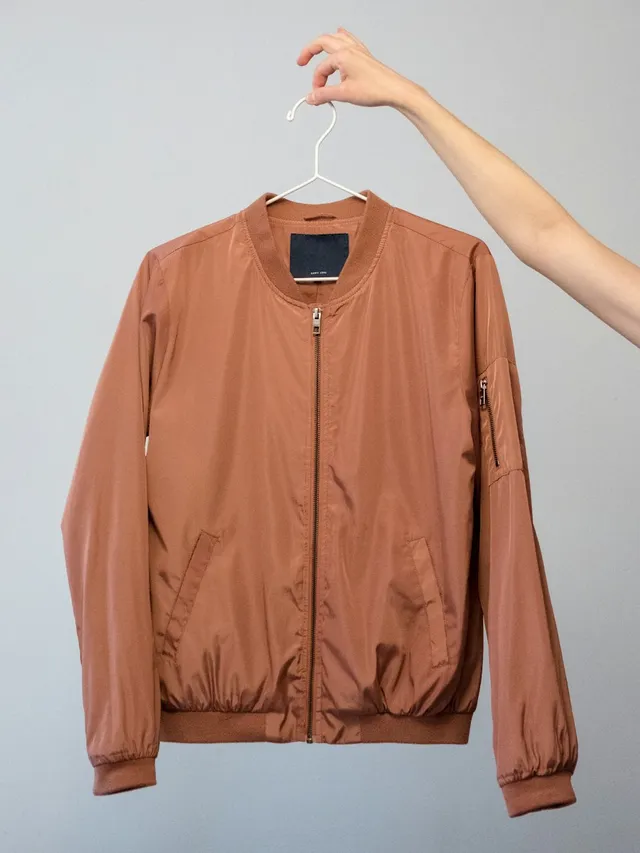
Rust vintage bomber
€48.00

Leather biker jacket
€120.00

Plaid scarf
€22.00

Minimal watch
€75.00
01Before the live
Give your live a title, pick the products you will present, in order, and share its link. The date can wait.
Streaming channels
TikTok
Stream key ••••••
Stream key ••••••
YouTube
Connected
Twitch
Connected
Connected
Kick
Connected
Server
rtmps://live.reborn…/app
Stream key
••••••••••••
Or your phone’s camera
Scan with your phone
02On air
Connect your channels once. Go live from OBS, Streamlabs or Larix, or simply with your phone’s camera: the video goes to all your platforms, with your overlays on top.
Live control
00:42:18
Rust vintage bomber
€48.00
1 in checkout
On sale
Take off sale
Leather biker jacket
€120.00
Orders
#1042
Lea D.
€48.00
Paid
#1041
Ines G.
€48.00
Paid
#1040
Lucas M.
€22.00
Paid
18 paid orders
03During and after
Put a product on sale: it shows on screen, your viewers buy it in two clicks and the stock updates by itself. When you end the live, your recap is waiting.
Multistreaming
The video you send from your software goes to all your channels at the same time. You run a single live; Reborn streams it everywhere.
01
YouTube, Twitch, Kick and Facebook link to your account. TikTok, Instagram and any RTMP server with their stream key.
02
The title, category and up to 10 tags of the live are sent to every platform, and updated as soon as you change them.
03
Bitrate, frames per second and dropped frames, platform by platform, so you know what is wrong before your viewers do.
04
Viewers can also watch on your page, in the YouTube, Twitch, Kick or Facebook player, with the buy button right below.
Unified chat & copilot
Comments from every platform land in a single feed. When someone writes “I’ll take it!”, the copilot spots them and sends the payment link of the right product, without you clicking anything.
Your reply goes to the chat of every platform that allows it. Reborn tells you where it landed.
A comment worth highlighting? It stays over the video until you take it off.
Each buyer gets the payment link of the product they ask for, once. Questions are set aside for you to answer at the right time.
Overlays
The product on sale, its price, the latest sales and the comments show over your video. Try it:
Settings
Format
Link for your streaming software
A “Browser” source pasted once in OBS: it follows the overlay chosen in the control room.
Payments
The viewer clicks, the product is held for them while they pay. Apple Pay, Google Pay or card: the sale is closed before you even present the next product.
The product is held during the payment, and back on sale if the payment is cancelled. The first to pay gets it.
Taken when the buyer clicks “Pay”, up to date in the control room, the overlay and the OBS dock.
Payments go through Stripe Connect: the money from your sales lands in your bank account, with the security of Stripe.
Billing address, company name and VAT number for business buyers.
Prefer your own shop? The viewer lands on its checkout, with the product already in the cart.
And everything else
Tools built for sellers who go live every week, on their own or as a team.
Broadcast, products, chat and orders on one screen. Put on sale, change a price or the stock in the middle of the live.
When the live ends: duration, peak viewers, comments, orders, revenue, conversion and best sellers.
Products, lives and orders, from Claude, ChatGPT or any assistant supporting MCP.
Scan a QR code: your phone becomes the camera, with your overlays. You run the live from the computer.
Run the live without leaving OBS: products, overlays and chat in a panel.
Rehearse without an audience: comments, buyers and sales come by themselves, nothing is broadcast.
One address to share everywhere: your next lives, your socials, and the live on air with its buy button.
Invite streamers and helpers by email: everyone prepares lives and manages the catalog.
Shops looking for streamers, streamers looking for products to sell.
Paste the link of a product: Reborn reads the page and fills it in. Shopify, with every detail.
TikTok, Instagram, YouTube, Twitch, Facebook and Kick, plus any platform giving a server and a stream key. All of them at the same time, from a single live.
No. You can go live from your browser, with your camera or screen sharing, or scan a QR code to use your phone’s camera. If you already use OBS, Streamlabs or Larix, just paste the server address and your key.
From your live page, or with the payment link the copilot sends them in the chat. They give their email and address, then pay with Apple Pay, Google Pay or a card.
The first to pay gets it. The product is held as soon as the buyer clicks “Pay” and back on sale if the payment does not go through. The other buyer is told in real time.
Payments go through Stripe Connect. Once your account is verified, the money from your sales is paid out to your bank account on Stripe’s payout schedule.
Yes: paste the link of a product and it is imported with all its details. Direct connection of Shopify, WooCommerce and PrestaShop shops, with prices and stock in sync, is coming soon.
No. It spots buyers and questions in the chat, and can automatically send the payment link of the product asked for. Your answers stay yours.
Yes, with demo mode: comments, buyers and sales come into the control room by themselves, and nothing is broadcast.
Reborn is in early access. Write to us to learn about the launch terms: we will answer you personally.
Live
Create your space, schedule your first live and let Reborn turn your viewers into buyers.